Battlefield 6 Server Browser: Release Date, Tabs and Which Servers Give Full XP
The Battlefield 6 Server Browser is coming early. EA's community update "Server Browser Coming Soon", published November 3, 2026, moves it from Season 5 Phase 3 (December 8) to a staged rollout that starts shortly after Phase 2 launches on November 10. A limited group of players gets it first. Everyone else gets it once EA is happy with server load and matchmaking.
For anyone grinding weapons or the Battle Pass, the important part is progression. The browser has three tabs, and they don't all pay the same: Official and Verified pay standard XP and weapon progress (bot kills on Verified pay less), while Custom pays partial XP. Join from the wrong tab and a night of play can earn a fraction of what you expected.
This guide covers everything EA has confirmed as of November 4, 2026. The newest patch notes on EA's news page are still Game Update 2.1.1.0 from October 12. Anything EA has not confirmed is marked as such.
Quick answer: The Server Browser starts with a limited public scale test shortly after November 10, 2026, then a full global launch. EA aims to finish both stages "over the course of a couple weeks" and has not given a date for either. It sits as the first tile in the Quickplay row. The Official tab gives full XP, weapon mastery and challenge progress. Verified pays standard XP too, but bot kills pay reduced XP. Custom gives partial XP. Official player-hosted servers stay online without the host and are delisted after 7 days empty.

BF 6 - Battlefield 6 Vehicle Leveling
Get Battlefield 6 Vehicle Leveling
When does the Battlefield 6 Server Browser come out?
The rollout starts shortly after November 10, 2026, but there is no fixed date for any player. EA's wording in the Server Browser community update: "The Server Browser in Battlefield 6 is arriving earlier than announced. Originally planned for Phase 3 of Season 5, we are pulling the timeline forward to begin our staged rollout shortly after Phase 2 launches on November 10!"
There are two stages:
- Limited Public Scale Test. "Shortly after Phase 2 launches, a limited group of players will receive access to the Server Browser directly in the live game." EA uses it to stress-test server loads, queues and matchmaking backfill.
- Full Global Launch. "Once live performance metrics are verified and any necessary fixes are deployed, the Server Browser will fully roll out for all players worldwide."
EA says it is "aiming to progress through these stages over the course of a couple weeks" and that the timeline "remains dependent on live testing results". If that holds, the global launch would land in late November, before the original December 8 slot. That is our reading of "a couple weeks", not an EA date. EA has also not said how players are picked for the first stage, so there is no known way to get in early.
The timeline so far:
| Date | Source | What EA said |
|---|---|---|
| October 9, 2026 | Season 5 roadmap | Server Browser arrives with Frozen Aces (Phase 3), alongside Platoons |
| October 21, 2026 | More to Season 5 | First tile in Quickplay, persistent lobbies, a dedicated blog to follow |
| November 3, 2026 | Server Browser Coming Soon | Moved forward to a staged rollout after Phase 2 on November 10 |
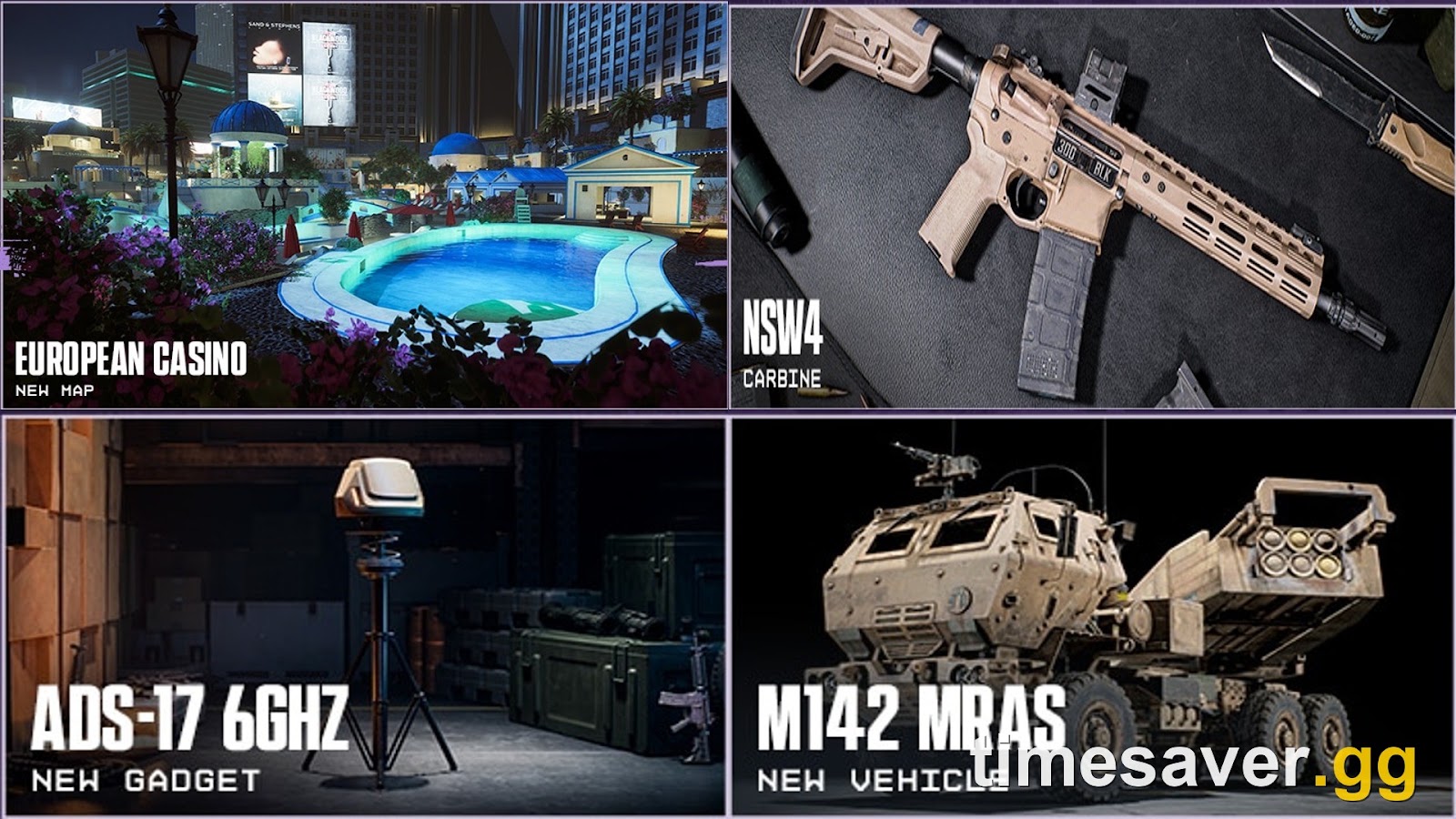
Phase 2 itself, the Casino Heist update, still lands November 10. Our Season 5 Phase 2 guide covers the European Casino map, the NSW4 and the SCW-10 and KV9 extended-mag changes.
Where is the Server Browser in the menu?
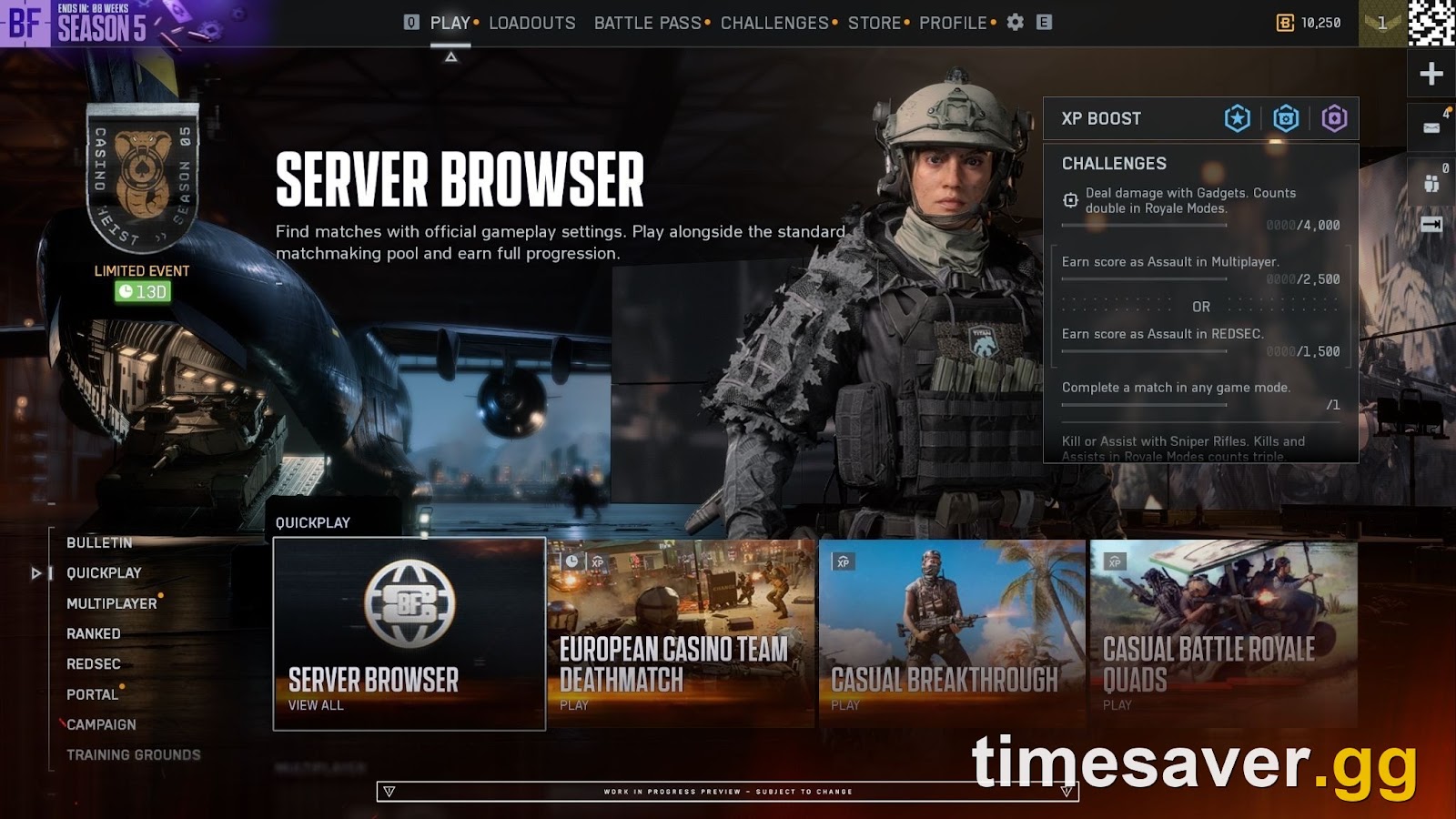
It is the first tile in the Quickplay row, labeled Server Browser, with a View All prompt. EA: "You will find the Server Browser located within the Quickplay row. Selecting it takes you straight to the new Official tab, instantly displaying active servers without any extra navigation." There are more tiles elsewhere, including in Portal.
EA's work-in-progress screenshot shows the tile in the Season 5 menu, next to the European Casino Team Deathmatch and Casual Breakthrough playlists. Its caption reads: "Find matches with official gameplay settings. Play alongside the standard matchmaking pool and earn full progression."

The Browse Servers screen in EA's preview has four tabs along the top: Official, Verified, Custom and Experiences. The text only describes three of them. Both screenshots carry EA's work-in-progress preview label, so the layout may still change before launch.
What are the Official, Verified and Custom tabs?
They split servers by how far the rules stray from standard matchmaking, and that decides your XP. This is EA's own table from the November 3 post:
| Browser tab | Description | Matchmaking backfill | Progression and XP |
|---|---|---|---|
| Official (Studios) | Dedicated instances hosted and maintained by Battlefield Studios | Full Matchmaking Integration | Full XP, Mastery Progression |
| Official (Player-Hosted) | Persistent servers hosted by players using official game templates | Full Matchmaking Integration (when running active rotation modes) | Full XP, Mastery Progression |
| Verified | Community experiences built on verified presets with custom rulesets in Portal | Player and Bot Fill; Direct Browser Join | Full XP Progression |
| Custom | Highly modified community sandboxes and custom logic scripts in Portal | Direct Browser Join and Community Invites | Partial XP Progression |
EA adds that "Existing Portal tools, rule modifiers, and admin controls in the Verified and Custom tabs remain completely unchanged." The browser is a new way to find servers. It does not change how Portal pays.
Which Server Browser servers give full XP and weapon mastery?
Official and Verified both pay standard XP; the Official tab is the one EA spells out as full XP, weapon mastery and challenge progress. In EA's words: "Every server in the Official tab awards full XP, weapon mastery, and challenge progression, matching standard matchmaking." Studio and player-hosted servers in that tab pay exactly like Quickplay.

The other two tabs need more care:
- Verified: full XP, but bots can fill the server. EA's Portal 101 guide says a Verified experience pays Career XP (match completion and win bonus), Hardware XP and Mission and Assignments progress "at exactly the same amounts as they would in a normal Multiplayer match". The progression page agrees. EA has separately said that "Bots grant reduced XP, while player XP remains at 100%" (its November 2025 update), and none of the EA posts we checked gives a percentage. On a Verified server full of bots, each bot kill pays less than a kill on a real player. Our bot lobby XP guide has the details.
- Custom: partial XP. The progression page explains what partial means: apart from extremely limited exceptions, Custom modes pay no XP for kills, assists, revives, squad spawns, spotting, class actions or objectives. They pay an increased match-completion bonus instead. Kills and assists are the main source of a weapon's Hardware XP, which is what unlocks attachments, so Custom play moves your Career Rank far more than your guns.
The weapon-leveling trap is the same one we keep seeing in player questions: Career XP and Hardware XP are separate. A Custom 24/7 server can look like fast progress on the end-of-round screen while the gun you care about barely moves. If attachments are the goal, stay on the Official tab, or on a Verified server with real players. Our XP boost guide explains which multipliers touch which XP track.
How do player-hosted servers work?
They run on EA's dedicated servers, so the host can log off and the match carries on. EA: "Official Player-hosted servers let you establish a reliable server that you and your squad can return to week after week. These run on a dedicated server, meaning the host does not need to stay in the match for the server to remain online."
The rules EA has published:
- Empty servers stay listed but get no matchmaking. "An empty server is not visible to the matchmaking system, meaning automated backfill will not populate an empty server on its own." One player has to join first. After that, matchmaking can start sending players in.
- 7 days empty and it is delisted. "A server remains active for up to seven consecutive days without any players before being delisted, and whenever players join, that inactivity timer resets."
- The host can end it, but logging off doesn't. The host can shut the server down at the end of a round or by starting a new server, but "leaving the game or logging off for the night will never interrupt ongoing matches for other players."
- Backfill depends on the mode. Active menu modes such as Conquest, Breakthrough and any featured playlist get automatic backfill once one player is inside. Off-menu modes can still be hosted, but "Matchmaking will not automatically route into these servers". If that mode returns to the menus later, backfill switches back on without re-hosting.
EA has not yet said who can host an Official player-hosted server, how many players one holds, or whether a Battle Pass is required. The only hosting figures EA has published are Portal perks: its Season 5 Battle Pass comparison graphic lists Portal persistent server hosting at "64 MAX" for the Battle Pass and "100 MAX" for Battlefield Pro, with nothing in the free column. Season 4 used the same figures. Those rows are about Portal, so don't assume they apply to the new Official tab until EA's promised full guide is out.
BF 6 - BF6 Account Leveling
Get BF6 Account Leveling
Does joining through Quickplay put you on the same servers?
Yes. Quickplay, Multiplayer, Custom Search and the Server Browser all use one official server pool. What changes is what happens when the round ends:
| How you join | What happens after the round |
|---|---|
| Server Browser | You stay on that server through its map rotation for as many rounds as you want, including 24/7 single-map servers |
| Quickplay or Multiplayer | Same pool, but on a server that repeats one map and mode, you are re-queued at round end so you "aren’t trapped in an unintended single-map loop" |
| Custom Search | If the server's next map doesn't match your filters, matchmaking moves you to a server that does |
EA says its recent backend matchmaking updates were made "while laying the groundwork for the Server Browser". If your squad kept getting split between rounds, persistent lobbies are meant to keep you together. If matchmaking is failing outright, use our server status guide instead.
What filters and features are in the Server Browser at launch?
Map and mode filters, four sort options, persistent lobbies, and studio and player-hosted servers in one list. EA's day-one list:
- Direct access to Official servers: Battlefield Studios and Official player-hosted servers together.
- Shared server pool: "Matchmaking actively helps keep browser-listed servers populated."
- Filtering and sorting: filter by Map or Mode, sort by Ping, Player Count, Server Name or Recommended.
- Full progression and mastery on the Official tab.
- Persistent lobbies: stay on one server with your squad between rounds.
What is not in the announcement matters as much:
- No ping cap filter announced. You can sort by Ping, but EA's list of filters has no maximum-ping option.
- No ticket count or match timer in the list. EA's preview list shows player counts (16/16, 64/64) and a ping value, and the side panel shows the server location, but there are no tickets or time left. One r/Battlefield6 player had a fair answer to that: "Joining late is completely fine on dedicated persistent servers with rotations of maps/gamemodes."
- Favorites are reportedly missing at launch. One commenter in the r/Battlefield thread posted a screenshot they said came from the Battlefield Discord, reading that there will be no favorites when it comes out. EA's announcement doesn't mention favorites either way, so treat this as unconfirmed.
- No crossplay toggle for PC. In its October 21 Q&A, EA said it doesn't "currently have plans" for one, because it would "potentially negatively affect" its matchmaking work.
EA promises "a full guide on how to use the Server Browser", so expect more.
What comes after the Server Browser?
The Server Browser was first meant to ship with Platoons in Phase 3, Frozen Aces, on December 8. EA's October 21 update says Platoons still arrive in Phase 3 "as planned", and that they will support up to 100 players with custom names and squad tags. It adds: "You will also earn an XP bonus whenever you play with fellow Platoon members in your squad." EA has not said how big the bonus is.
Combined with persistent servers, that should make December a good time for a regular squad to settle on one Official server. Until then, the Official tab will pay the same as Quickplay from the day you get access. Check the weekly reset times in our challenges reset guide so your Official-server sessions count toward assignments too.
Short on time for the grind? Official servers pay standard XP, which still means a lot of hours per weapon. timesaver.gg can take the grind off your hands.
- Battlefield 6 Weapon Leveling: Hardware XP and attachment unlocks for supported weapons
- Battlefield 6 Account Leveling: Career Rank boosting by hand-play
- All Battlefield 6 services: the full catalog
FAQ
When does the Battlefield 6 Server Browser release? EA starts a staged rollout shortly after Season 5 Phase 2 launches on November 10, 2026. A limited public scale test comes first, then a full global launch. EA aims to finish both "over the course of a couple weeks" but has not given a date for either stage.
Why can't I see the Server Browser yet? Before November 10 it isn't live for anyone. After that, the first stage only covers "a limited group of players", so most people won't see the tile until the full global launch. EA has not said how players are chosen.
Does the Battlefield 6 Server Browser give XP? Yes. Every server in the Official tab gives full XP, weapon mastery and challenge progress, the same as standard matchmaking. Verified servers pay Career XP, Hardware XP and assignment progress at standard rates, though bot kills pay reduced XP. Custom servers give partial XP: apart from extremely limited exceptions, no XP for kills, assists or objectives, plus a larger match-completion bonus.
Can I level weapons on Server Browser servers? On the Official tab and on Verified servers, yes, at the same rate as Quickplay, though kills on bots in Verified pay reduced XP, so real-player servers level guns faster. On Custom servers, weapons level slowly because kills and assists earn no XP there.
Do I need to stay online to keep my server running? No. Official player-hosted servers run on a dedicated server, so the host can log off and current matches keep going. A server is delisted after seven straight days with no players, and the timer resets whenever someone joins.
Do I need to own Battlefield 6 to use the Server Browser? EA's October 21 update says it plans to show the Server Browser as the first Quickplay tile "for owners of Battlefield 6", and describes the Verified and Custom Portal tiles as shown to Battlefield 6 owners too. EA has not said whether players on free REDSEC alone get any access, so check again after the global launch.