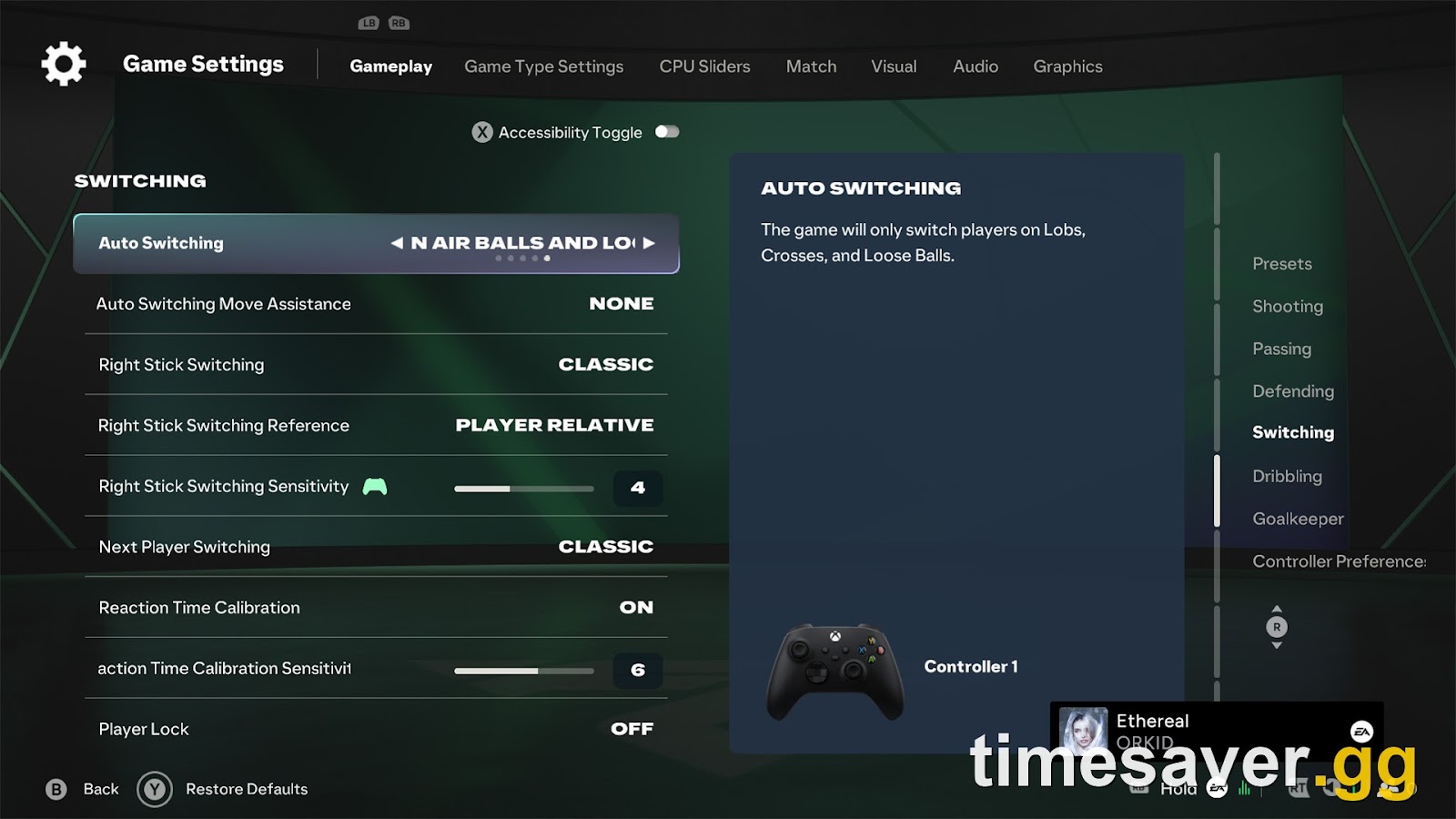
The best FC 27 controller settings for Rivals and FUT Champions start in one place: the Switching menu. Set Next Player Switching to Goal Side, keep Auto Switching on "On Air Balls and Loose Balls", and keep Auto Switching Move Assistance on None. If L1/LB keeps handing you a defender who isn't the one under the indicator, Reaction Time Calibration is a likely cause, so try it off. No switching setting appears on any published list of Competitive preset locks, so you should be able to change all of them for online play.
This guide covers EA SPORTS FC 27 as it is right now: Season 2 of Ultimate Team, with Road to the Knockouts live since 6 November and Title Update 1.2.0 still not out (EA says "mid-November" and hasn't named a day). Every setting name, option and default below comes from EA's own FC 27 Accessibility Resources page, which describes the full in-game Settings menu. The recommendations on top of that are ours, and we explain each one so you can tell when to ignore it.
TLDR: FC 27 best controller settings in 30 seconds. Switching: Auto Switching On Air Balls and Loose Balls (default) · Move Assistance None · Right Stick Switching Classic · Reference Ball Relative (Player Relative if you defend in a deep, compact block) · Sensitivity 4 to 6 · Next Player Switching Goal Side · Reaction Time Calibration Off if L1 picks the wrong defender · Player Lock Off (it's an attacking tool, not a switching fix). Defending: Advanced Defending, Pass Block Assistance On. Passing: Ground Pass Assisted, Through Pass Assisted or Semi, Pass Receiver Lock Late. Camera: Online 11v11 Competitive or Tele Broadcast, Height up, Zoom down. Locked online: community guides list five settings the Competitive preset forces (Auto Shots, Assisted Headers, Auto Flair Pass, Auto Clearances off, Jockey Manual). None of the 9 switching settings is on that list. EA's loose-ball switching fix arrives with Title Update 1.2.0, mid-November.
EA Sports FC 27 - Coins
Stock up on Coins
Why does player switching feel worse in FC 27?
Switching feels worse because EA made the defenders you aren't controlling weaker, not because the switching options changed. We compared EA's FC 27 accessibility page with its FC 26 equivalent line by line: the Switching section has the same 9 settings with the same defaults in both games. What changed is everything around it.
EA's FC 27 Gameplay Deep Dive spells it out. In its words: "We've also reduced AI defensive reach for interceptions. A manually-controlled defender will be able to reach further than an AI-controlled defender, encouraging you to switch to the player actively defending instead of relying on AI teammates to win possession."
Teammate Contain was cut back in the same way. AI teammates now mark the ball carrier "from a slightly longer distance than before, requiring the user to switch to them and manually defend if they want to press the dribbler more effectively." EA also said this design is meant to last: "These improvements put greater emphasis on manual defending and the decisions you make throughout a match – which is something we aim to preserve throughout the FC 27 life cycle." Note one scope detail in the Deep Dive: the reduced AI defending applies to Competitive gameplay, which is what Rivals, Champions and every other online match use.
So in FC 26 a bad switch was often covered by an AI defender who stepped in anyway. In FC 27 the AI defender reaches less, and the cost of every wrong switch is a clear run at goal. That's the complaint behind a r/EASportsFC thread on 7 November: the poster said both the automatic switch and L1 hand them a player far out to the side instead of the one in front of the runner, and that they'd had to find a manual workaround.
For the full defending picture (jockey, stand tackles, Team Press) see our FC 27 manual defending guide. This article is about the settings menu.
What does each FC 27 switching setting actually do?
Here are all 9 switching settings, with EA's options and defaults and the value we recommend for online play. You'll find them under Settings > Game Settings > Gameplay > Switching.
| Setting | Options (default first) | Our pick for Rivals and Champions |
|---|---|---|
| Auto Switching | On Air Balls and Loose Balls, Manual, Only on Air Balls, Automatic, Only on Loose Balls | On Air Balls and Loose Balls |
| Auto Switching Move Assistance | None, Low, High | None |
| Right Stick Switching | Classic, Player Rotation, Adaptive | Classic |
| Right Stick Switching Reference | Player Relative, Ball Relative | Ball Relative (see below) |
| Right Stick Switching Sensitivity | 0 to 10, default 4 | 4 to 6 |
| Next Player Switching | Classic, Goal Side, Closest to Ball | Goal Side |
| Reaction Time Calibration | On, Off | Off if L1 feels wrong |
| Reaction Time Calibration Sensitivity | 0 to 10, default 6 | Only matters if Calibration is On |
| Player Lock | Off, On | Off (attacking tool) |
Which setting fixes L1 picking the wrong defender?
Next Player Switching is the setting that controls L1/LB, and it's the one most players never touch. EA describes three modes:
- Classic (default): the next player "is selected by the title as being in the most favorable position based on a variety of factors." You don't know what those factors are, and that's the problem.
- Goal Side: "favors players on the goal side of the ball." This is the defender between the runner and your goal.
- Closest to Ball: "favors players closest to the ball." Useful for pressing high, risky against a through ball, because the closest player is often the one already beaten.
Use Goal Side. In FC 27 the only defender worth switching to on a counter is the one who can still get in front of the ball carrier, and Goal Side is the only mode built to pick that defender. If you play a high press (see our 95-depth offside trap guide), test Closest to Ball, because your defenders already sit high.
The second suspect is Reaction Time Calibration, which is On by default. EA's description: when it's on, the game accounts for "the possible delay between deciding to switch players, and pressing the button to do so, by ignoring the currently recommended player and switching to the one before." Put simply, by default L1 doesn't always give you the player under the indicator. It gives you the one the indicator was on a moment earlier. Reaction Time Calibration Sensitivity (0 to 10, default 6) sets how long that look-back is.
If you watch the Next Player Switch Indicator (a Visual setting, On by default) and press L1 when it's on the right player, Calibration can work against you. Turn it Off and L1 should follow the indicator rather than the player it was on a moment earlier. If you switch late and on instinct, leave it on. This is the only switching setting where we'd say "test both", because it depends on your reaction speed.
Should you use Auto Switching or Manual in FC 27?
Keep the default, On Air Balls and Loose Balls. EA lists five Auto Switching modes, and the two extremes both cost you goals in FC 27:
- Manual never switches for you on a cross or a loose ball. With reduced AI reach, you can't count on an AI defender to win a loose ball near your box, so you want the game to hand you that player.
- Automatic switches whenever the game decides to, which makes the "wrong defender, out to the side" problem from that Reddit thread more frequent, not less.
Auto switching does have known bugs, and EA has admitted them. In its October Gameplay Developer Notes (28 October), under "Loose Ball Switching Improvements", EA wrote: "We've also identified several situations where auto player switching doesn't select the player closest to the ball as expected." The fixes target specific situations, including three EA names: after a teammate completes a slide tackle, following a headed pass, and after a shot misses the target. It ships with Title Update 1.2.0, which EA scheduled for "mid-November" without naming a date. Until it lands, expect bad auto-switches especially in those three moments, and switch manually after any slide tackle by your team. Our Title Update 1.2.0 breakdown covers the rest of that patch.
Auto Switching Move Assistance should stay on None (the default). On Low or High, EA says the player you switch to "will continue moving in their current direction for a period of time." That's useful in theory. In practice, a defender who keeps running the wrong way for a beat is a defender the attacker has already passed.
Player Relative or Ball Relative for right stick switching?
Right Stick Switching should stay on Classic: a flick switches "to the next nearest player in the direction of the flick." Player Rotation only moves the indicator and needs L1 to confirm, which costs time. Adaptive switches further the longer you hold the stick, which is hard to do consistently under pressure.
Right Stick Switching Reference is the more interesting choice:
- Player Relative (default): the flick is measured from the player you're controlling.
- Ball Relative: the flick is measured from the ball.
Our pick is Ball Relative for Rivals and Champions. When you're defending, you care about where the ball is going, not where your current defender is standing. "Flick toward the ball's path" is easier to do on instinct than working out the angle from a centre-back who has just been beaten. If you mostly switch to reach players around your own defender (in a deep, compact block, for example), Player Relative is fine. Choose one and stick with it for 20 matches, because the muscle memory matters more than the choice.
Right Stick Switching Sensitivity runs 0 to 10 (default 4). EA's description: "The higher the number selected, the more the game will respect the decision of which direction and how long the stick is held for." If your flicks keep landing on the wrong player in the right general direction, raise it one step at a time to 5 or 6.
Player Lock is Off by default, and we'd leave it there unless you use it in attack. When it's On, pressing both sticks locks you to the selected player "regardless of any automated switching behaviors". EA treats it as an attacking tool: you control a runner off the ball while the CPU carries it. It isn't a fix for bad switching. EA also made it riskier in FC 27. Its Closed Beta feedback Pitch Notes say that when you lock away from the ball carrier, "the ball carrier will no longer automatically dribble around or avoid defenders. Instead, they'll continue moving in the direction they were already travelling." The CPU carrier's passes also get slightly more error. That's useful when you're defending: if the ball carrier suddenly runs in a straight line while a runner darts in behind (the 4-3-1-2 narrow meta loves this, see why the 4-3-1-2 is everywhere), your opponent is probably using Player Lock, so close down the ball carrier.
EA Sports FC 27 - FUT Champions Boost
Get fut champions boost in 10 minutes
Which FC 27 settings are locked in Rivals and Champions?
The Competitive preset is mandatory online, and it locks a small set of assists. EA's accessibility page describes it as the preset that "applies the settings that are mandatory for all players in online multiplayer modes, to offline play too", but it doesn't list which settings those are.

Community guides for FC 27 (games.gg among them) report five greyed-out settings: Auto Shots Off, Assisted Headers Off, Auto Flair Pass Off, Auto Clearances Off, Jockey Manual. An in-game capture of the FC 27 Defending menu (below) shows two of them, Auto Clearances and Jockey, greyed out at OFF and MANUAL. That's the same family of locks EA introduced with the Competitive Master Switch in FIFA 22. Treat the exact list as community-verified and check your own menu: a greyed-out row is locked.
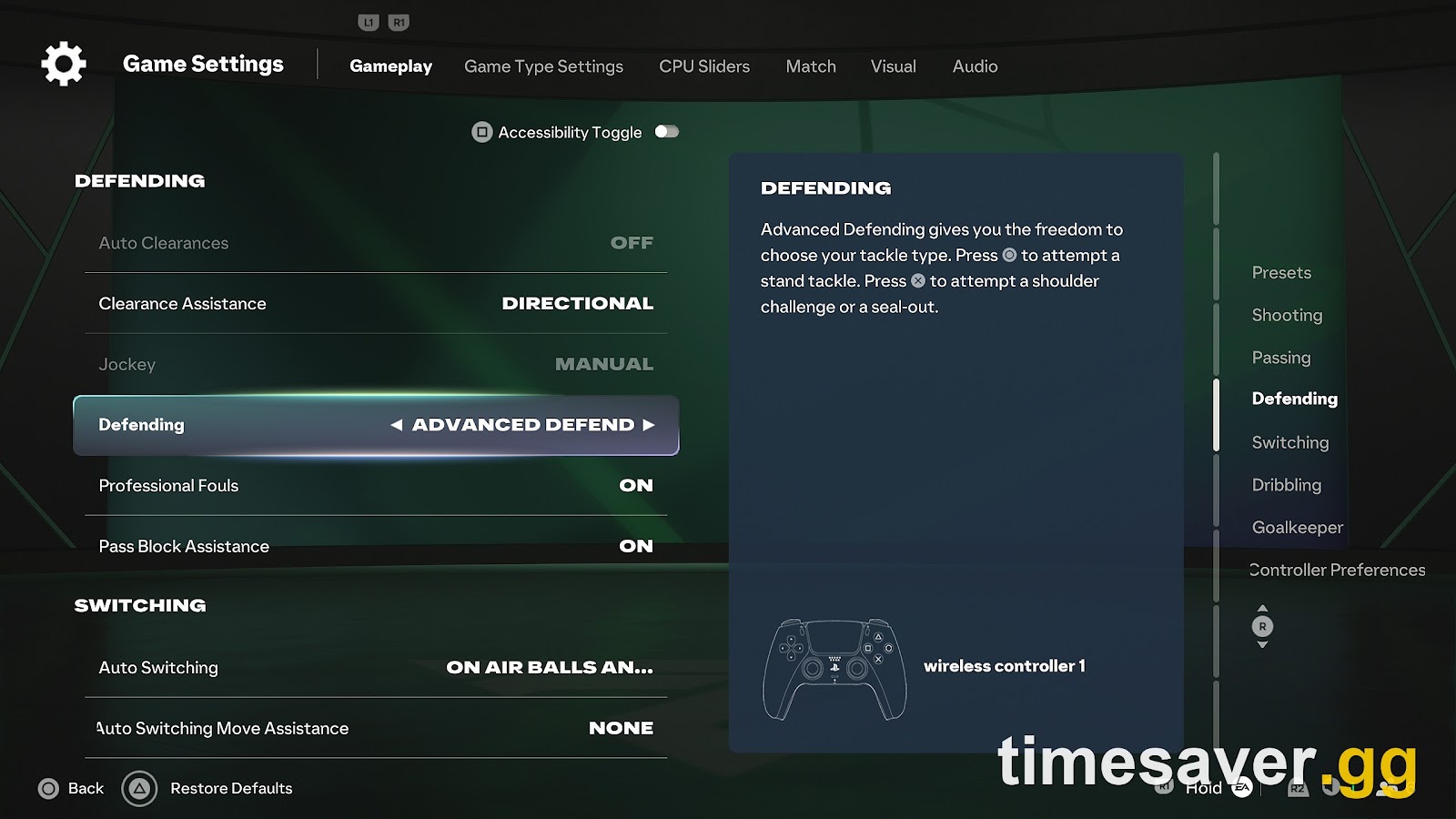
What matters for this guide: in that capture, the two switching rows visible below the locked Defending rows (Auto Switching and Auto Switching Move Assistance) are not greyed out, and no published list of Competitive locks includes a switching setting. Check the rest of the Switching section in your own menu, but everything in the table above should be yours to change for online play.
What are the best FC 27 defending and passing settings?
Defending (Settings > Game Settings > Gameplay > Defending):
- Defending: Advanced Defending (default). It's the only mode where you choose the tackle type with different buttons. Tactical Defending picks the tackle for you. Legacy Defending isn't available with the Competitive preset.
- Pass Block Assistance: On (default). With it On, "AI and User controlled players will attempt to intercept passes automatically." Turning it off means triggering every block yourself, which few players gain from.
- Clearance Assistance: Directional (default). The game takes your stick direction into account when it picks where the clearance goes.
- Professional Fouls: On (default). Turning it off only removes the input, so there's nothing to gain.
Passing (Settings > Game Settings > Gameplay > Passing). All five passing assists default to Assisted, with Manual and Semi as the alternatives:
- Ground Pass Assistance: Assisted. Manual ground passing loses far more than it gains online.
- Through Pass Assistance: Assisted or Semi. EA already removed most of the steering in FC 27: through passes "no longer heavily assist you by steering toward open lanes away from your aim" (Gameplay Deep Dive). Even on Assisted, your aim decides more than it did in FC 26. Semi only pays off if you've already practised it.
- Pass Receiver Lock: Late (default). The receiver is locked "as late as possible", so a change of direction mid-animation still counts. Animation Start and Power Up lock earlier.
- Precision Pass Sensitivity: Normal (default). High reduces assistance further.
Shooting: Shot Assistance has three modes: Assisted (default, "ensure the player always aims at the goal"), Precision ("partial assistance") and Manual. Stay on Assisted unless you're practising Precision offline. A missed shot costs more than a slightly better angle gains.
Goalkeeper: EA's FC 27 page lists Save Assistance as Assisted by default (its FC 26 page said Semi).
What is the best FC 27 camera setting?
Online 11v11 Camera defaults to Competitive, and it's the right starting point. EA lists 12 options for online 11v11: Competitive, Tactical, EA Sports GameCam, Tele Broadcast, Tele, Co-Op, Classic, Dynamic, End to End, Pro, Broadcast and Legacy.

Our recommendation is Competitive or Tele Broadcast, with Height raised and Zoom lowered from the default 10 (each runs 0 to 20). Raising Height lifts the camera, and lowering Zoom pulls it back so players look smaller and you see more of the pitch. Start around Height 15 to 20 and Zoom 0 to 5, then adjust for your screen size and how far you sit from it. A wider view shows you the defender you need to switch to before the attacker gets there. That's worth more in FC 27 than in any recent FC game, given everything above. Tactical is the other common pick. Avoid Pro and Dynamic for 11v11 online.
Two FC 27 details: Offline 11v11 Camera is a separate setting (also Competitive by default), so changing one doesn't change the other. And Height and Zoom don't apply to the Pro camera, which has its own Zoom, Speed and Swing sliders.
What should you change before your next Weekend League?
Go through these in order before your first Champions match. It takes about two minutes:
- Switching > Next Player Switching: Goal Side.
- Switching > Reaction Time Calibration: Off, if L1 has been picking the wrong defender.
- Switching > Auto Switching: On Air Balls and Loose Balls. Move Assistance: None.
- Switching > Right Stick Switching: Classic, Reference: Ball Relative, Sensitivity: 4 to 6.
- Switching > Player Lock: leave Off unless you use it in attack.
- Visual > Next Player Switch Indicator: On.
- Visual > Camera: Online 11v11 on Competitive or Tele Broadcast, Height up, Zoom down.
- Play two Squad Battles or friendlies before Rivals or Champions to test the new switching. Your first matches with new settings will feel wrong for a while.
Two problems settings won't fix: if your players swap positions at kick-off, that's a separate known bug (see our kick-off position swap fix), and if your inputs feel delayed in Champions only, check connection and crossplay before blaming the controller.
Wondering whether the grind pays off once your settings are sorted? We priced every win in FC 27 FUT Champions: is it worth it?
Settings sorted but no time for 15 Weekend League matches? Our pro players can play your Champions games, or you can skip the grind and build the squad straight away.
- EA FC 27 FUT Champions Boost: Weekend League wins played by pro players
- EA FC 27 Coins: Comfort Trade with paced delivery
- EA FC 27 Evolutions Boost: Evo matches and wins done for you
- All EA FC 27 services
FAQ
What are the best FC 27 controller settings for player switching? Next Player Switching on Goal Side, Auto Switching on "On Air Balls and Loose Balls", Auto Switching Move Assistance on None, and Right Stick Switching on Classic with Ball Relative reference and sensitivity 4 to 6. Turn Reaction Time Calibration Off if L1 picks the wrong defender.
Why does L1/LB switch to the wrong player in FC 27? Two settings are the usual suspects, alongside the auto-switching bugs EA has acknowledged. Next Player Switching defaults to Classic, which picks by "a variety of factors" instead of goal-side position, and Reaction Time Calibration (On by default) deliberately switches to the player the indicator was on a moment earlier. Set the first to Goal Side and try the second Off.
Can you change switching settings in FUT Champions and Rivals? Yes. The Competitive preset locks a few assists (community guides list Auto Shots, Assisted Headers, Auto Flair Pass, Auto Clearances and Jockey), but none of the 9 switching settings appears on those lists.
Did EA fix auto switching in FC 27? Not yet. EA's 28 October Developer Notes confirmed auto switching sometimes fails to pick the player closest to the ball, and promised targeted fixes, including after a slide tackle, after a headed pass and after a missed shot, in Title Update 1.2.0, scheduled for mid-November. As of 8 November it hasn't been released.
What is the best camera in FC 27? Competitive (the default) or Tele Broadcast for online 11v11, with Height raised and Zoom lowered from the default 10 on the 0 to 20 scale. Tactical is the other popular option.
Are FC 27 switching settings different from FC 26? No. EA's accessibility pages for both games list the same 9 switching settings with the same defaults. Switching feels worse because FC 27 reduced AI defenders' interception reach, so the player you control matters more.