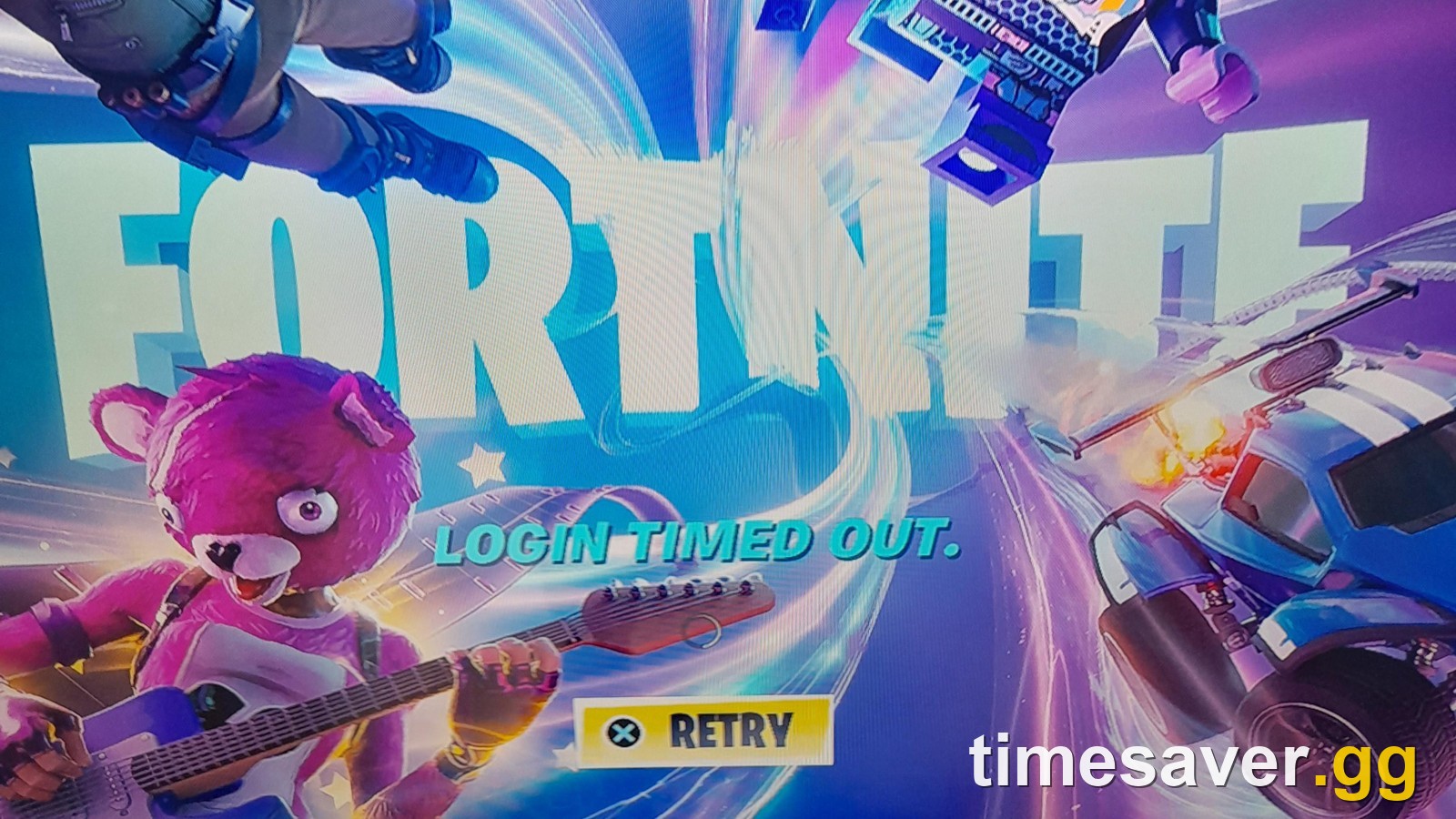
"Login Timed Out" is one of the most annoying Fortnite errors because it hits before you even reach the lobby. You press Play, the title screen loads, and instead of your Locker you get a LOGIN TIMED OUT. message with a Relaunch button on PC or a Retry button on console. It was still turning up on r/FortNiteBR on 17 November 2026, in the middle of the Treasure Hunters mini-season (update v43.10). This guide shows how to tell whether the problem is Epic's or yours in under a minute, then walks through Epic's own fixes for each platform, in order of what is most likely to work.
Quick answer (checked 17 November 2026, 15:30 UTC):
1. Check the servers first. Open status.epicgames.com. If Fortnite or Login isn't green, it's an outage or a downtime and only waiting helps. When we checked, every Fortnite and Login component was operational.
2. If the servers are fine, look at your device and network next. Epic says this error "appears when the game cannot load quickly enough to connect to our servers."
3. Fix it by platform: on PC, update your graphics driver, close background apps and verify the game files. On PS5, Xbox or Switch, clear the console cache. On every platform, restart your modem and router, then try a public DNS or a mobile hotspot.

Fortnite - Fortnite Crew
Get Fortnite Crew
What does "Login Timed Out" mean in Fortnite?

Fortnite has to sign you in to Epic's services before it can load your account, Locker and party. If that handshake doesn't finish in time, the game gives up and shows "Login Timed Out". The older version of the same failure reads Login Failed: Unable to login to Fortnite servers. Please try again later. Epic's support article for that message gives the cause in one line:
"This error appears when the game cannot load quickly enough to connect to our servers." (Epic Games Player Support)
So there are only two possible culprits:
- Epic's side. A server outage, a scheduled update downtime, or login servers that are overloaded during a big event.
- Your side. A slow or blocked connection, a stale console cache, a PC that is struggling to load the game, or security software getting in the way.
That's why the first step is always the same: rule out Epic before you touch your settings.
Is Fortnite down right now? Check this before anything else
Epic's own advice for any "can't connect" problem starts with its status page: "If you're having trouble logging into one of our games or if you were kicked out in the middle of a round or match, it may be due to a server outage." (Epic Games Player Support)
Here is the 60-second check:
- Open status.epicgames.com and look at the Fortnite and Login rows. Anything other than "Operational" means the problem is on Epic's end.
- Look for a scheduled maintenance banner. Epic posts update downtimes there with the time in UTC.
- Check the official Fortnite Status account on X. That's where Epic posts "we're investigating" messages and the all-clear.
If an update is the cause, waiting is the only fix. Update downtimes this season have been short but not instant:
| Update | Downtime start (UTC) | Back online (UTC) | Length |
|---|---|---|---|
| v43.00 (Treasure Hunters launch) | 1 Nov 2026, 05:00 | 1 Nov 2026, 08:12 | about 3 h 13 min |
| v43.10 (Buggy boss, new Sprites) | 12 Nov 2026, 09:00 | 12 Nov 2026, 10:49 | about 1 h 49 min |
Times come from Epic's status page history. For the live picture and the next downtime, our Fortnite server status page is updated on every update day.
On the afternoon of 17 November 2026 (15:30 UTC) Epic's status page showed All Systems Operational, with no incidents and no maintenance scheduled. If you're getting "Login Timed Out" today and the status page is still green, start with the fixes for your device and network below. If none of them work, the problem may be one Epic hasn't posted yet, so check Fortnite Status on X again before you contact support.
How do you fix Fortnite Login Timed Out on PC?
Epic lists three PC fixes for this exact error. Do them in this order:
- Update your graphics card driver. Epic links this first because an old driver can make the game load too slowly to reach the login servers in time. Get the latest driver from NVIDIA, AMD or Intel, not from Windows Update.
- Close background applications. Recording software, overlays, browser tabs with video and download managers all compete for CPU, disk and bandwidth while Fortnite is trying to sign you in.
- Check your PC meets the minimum specs. If your machine only just runs the game, loading can take long enough to time out.
If none of those work, these are the next steps from Epic's connection troubleshooting and ESP error articles:
- Verify the game files. In the Epic Games Launcher, open your Library, click the three dots on Fortnite, choose Manage, then Verify. A damaged file can stop the game from finishing its startup checks.
- Run the launcher as an administrator and clear the launcher cache. Epic lists both as fixes for connection errors.
- Flush your DNS. Open Command Prompt and run ipconfig /flushdns, then restart the launcher.
- Allow Fortnite through your firewall and antivirus. Epic warns that "antivirus, firewall, or security software can block the connection." It names Bitdefender specifically for the ESP-DIST-001 version of this problem.
- Free up disk space. Epic asks for at least 10 GB free on the drive Fortnite is installed on.
- Sync your PC's clock. Epic's connection checklist includes it, and a clock that's out of sync can break secure sign-ins. In Windows, open Settings, Time & language, Date & time, and click Sync now.
A full reinstall isn't a guaranteed fix. One r/FortNiteBR player wrote that they had "restarted my PC, formatted my drive, uninstalled and reinstalled both Fortnite and epic games launcher" and still got the error. That's one player's experience, not a measured success rate. If a clean install doesn't help, try the network and security-software steps below before you reinstall again.
How do you fix Login Timed Out on PS5, PS4 and Nintendo Switch?
On consoles Epic's main fix is simple: clear your console's cache. Epic has separate guides for PlayStation and Nintendo Switch, linked from its Unable to login article.
- PS5: Epic's PlayStation cache article sends you to Sony's Safe Mode guide. Turn the console fully off (not Rest Mode), start it in Safe Mode, then choose Clear Cache and Rebuild Database and Clear System Software Cache.
- PS4: PS4 Safe Mode has no clear-cache option, so don't look for one there. Fully power the console off instead of using Rest Mode, then start it again and launch Fortnite.
- Nintendo Switch: go to System Settings, then System, Formatting Options and Clear Cache, and pick your user. Then restart the console fully rather than using sleep mode. On Switch 2, follow Epic's Switch cache guide (linked from the same Epic article) in case the menus differ.
If clearing the cache doesn't help, try the network fixes below. Switch players should also check their Wi-Fi signal in the console's internet settings, because a weak handheld connection is a common reason for the login to time out.
How do you fix Login Failed and Login Timed Out on Xbox?
Xbox gets its own Epic article, written for the "Login Failed" message. These are Epic's steps, in order (Epic Games Player Support):
- Clear your Xbox Series X or S cache. Epic's method: turn the console off, unplug it and every accessory, wait two minutes, press and hold the power button while it's still unplugged, then plug it back in and start the game.
- Fully quit Fortnite from the dashboard. Press the Xbox button, select Home, highlight Fortnite, press Menu and choose Quit. Then start the game again.
- Restart your modem and router.
- Switch your Xbox to a public DNS.
- Remove and re-add your Xbox profile.
- Reset the console using "Reset and keep my games & apps", which doesn't delete your games.
- Contact Xbox Support if all of that fails.
There's one Xbox-only message that Epic can't fix. Epic says players seeing "Error Connecting to Epic Services Queue" "must reach out to Microsoft Support for assistance."
Fortnite - Cheap Fortnite Account
Get Cheap Fortnite Account
Which network fixes work on every platform?

If the platform fixes didn't work, the next place to look is the connection between your device and Epic. Epic's connection troubleshooting checklist has 12 steps. These are the ones that matter most for a login timeout:
- Restart your modem and router. Unplug both for 30 seconds, plug the modem in first, then the router.
- Switch to a public DNS such as Google's or Cloudflare's. Epic recommends it on PC and consoles.
- Turn off any VPN or proxy. Epic lists both as connection blockers.
- Use a wired connection if you can. Epic notes that a wired connection "is more stable than Wi-Fi".
- Turn off nearby Bluetooth devices on Wi-Fi. Epic's ESP article says they "can interfere with wireless signals".
- Test a different connection, such as a mobile hotspot. This is the quickest way to find the cause. Epic's own wording: "If the error stops, the issue is with your network, so contact your internet service provider."
Router security features are worth checking too. Replying to a 17 November thread, an r/FortNiteBR player suggested that "the router you're using has a built in protection" that may be "flagging Fortnite or your device as bad". Many router apps have a "threat protection" or parental control setting that can block game traffic. If Fortnite connects on a hotspot but not at home, look at those settings before you call your ISP.
The red ESP-DIST-001 screen ("An error occurred while connecting to Epic servers") is a close relative of Login Timed Out. Epic describes ESP errors as "usually connection-related", and the same steps fix both. If you get matchmaking errors once you're logged in, see our Fortnite matchmaking error guide.
Why does Login Timed Out keep coming back?
If the error goes away after a relaunch but keeps returning, one of these is usually the reason:
- Busy events. Login servers come under the most pressure in the first hour after a downtime and during live events. The Chapter 7 end event on Saturday 5 December 2026, announced in Epic's Treasure Hunters launch post, is the next big one. Our live event time page has the schedule. If you get the error at a time like that, wait 10–15 minutes before retrying.
- A slow first load after an update. The first launch after a patch has the most to load and check. One player described a sibling who just restarts "the game a couple of times" until it gets in. That's a player workaround, not an Epic fix, but it costs nothing to try.
- Unstable Wi-Fi. A connection that drops for a few seconds can be enough to miss the login window, even when web pages seem to load fine.
- An account problem that looks like a network one. If you also can't sign in on fortnite.com or the Epic Games Launcher, the problem may be your account rather than the game. Our hacked Epic account recovery guide covers what to do if your email or password was changed.
If Fortnite won't even reach the title screen, or it crashes on startup, that's a different fault. Our Fortnite not launching and crashing fix covers it.
When should you contact Epic support?
Contact Epic Player Support if all of the following are true:
- Epic's status page shows everything operational.
- You've worked through the fixes for your platform and the network steps.
- The error still happens on a different connection, such as a mobile hotspot.
Include your platform, the exact error text and when it started. On Xbox, Epic says the last step is Xbox Support. For "Error Connecting to Epic Services Queue", go to Microsoft directly. Never give your password or 2FA code to anyone who messages you offering to "fix" a login. Epic support will never ask for them. Our Fortnite 2FA guide explains how to keep the account locked down.
FAQ
Why does Fortnite say Login Timed Out? The game couldn't finish signing in to Epic's servers in time. Epic says the "Unable to login" version of the error "appears when the game cannot load quickly enough to connect to our servers". The cause is either an Epic outage or downtime, or a slow device or network on your side.
Is Fortnite down right now? Check status.epicgames.com and the Fortnite Status account on X. At 15:30 UTC on 17 November 2026, Epic's status page showed all Fortnite and Login components as operational, with no maintenance scheduled.
How do I fix Login Timed Out on PC? Update your graphics driver, close background apps and check your PC meets the minimum specs. Those are Epic's three steps for this error. Then verify the game files in the Epic Games Launcher, flush your DNS, allow Fortnite through your firewall and restart your router.
How do I fix Login Timed Out on Switch or PS5? On PS5, use Safe Mode's Clear Cache and Rebuild Database option. On Switch, go to System Settings, System, Formatting Options, Clear Cache. Restart the console fully rather than using sleep or Rest Mode, then restart your router and try a public DNS. A mobile hotspot test tells you whether your home network is the problem.
Does reinstalling Fortnite fix Login Timed Out? Not always. Some players report reinstalling the game and the launcher with no change. Epic doesn't list a reinstall among its fixes for this error, so verify the files once, then work through the network and firewall steps before reinstalling.
Will I lose progress or Battle Pass rewards if I can't log in? No. Your progress is stored on your Epic account, not on your device. Missed time only matters for limited events. The Fortnite wiki lists the Treasure Hunt quests closing on 4 December 2026.
Need help with another Fortnite error?
Stuck on another Fortnite error? These guides are kept up to date for every update: