Modern Warfare 4 has been live worldwide since October 23, 2026, and the error messages have changed with it. Since launch, the reports we see in player threads center on Secure Attestation Wizard failures on PC, DEV ERROR boot crashes, PlayStation CE-34878-0 crashes, Xbox lobby crashes, and four bugs Activision lists as officially under investigation. This page lists the common MW4 error codes and messages we can tie to a public source, what each one actually means, and the fix — with official Activision steps clearly separated from community workarounds. Last checked: October 24, 2026.
Call of Duty: Modern Warfare 4 - Bot Lobbies
Get bot lobby in 10 minutes
Quick answer (TL;DR)
- PC won't let you play online? MW4 requires both TPM 2.0 and Secure Boot; without them Activision says you are "restricted from playing any online game mode." Run the official Call of Duty Secure Attestation Wizard (v1.3.0, updated October 21, 2026) — it names the exact failing check.
- "Authorization Key Failed" = Activision says Windows UAC blocked the scan. Select Generate Key and approve the enrollaik.exe prompt.
- "TCG Event Log Failed" = Windows is out of date. Restart and install the latest Windows update.
- DEV ERROR 0x723AC2A5 / 0x00001338 on PC is community-documented, not on Activision's list. The fixes players report working: turn off ray tracing and frame generation, close the NVIDIA app overlay, and let shaders finish compiling. Getting 0x00001337 with ntdll.dll instead? See our 0x00001337 GameInput guide.
- CE-34878-0 on PlayStation is a general game crash. Activision's MW4 page lists it under PS5 (Sony documents the code as a PS4 error). Activision's fix: restart the game, update system software, delete old data.
- Four official known issues (October 24): can't save Loadouts, stats not showing, no Launch button in COD Home on Xbox on PC, and DMZ Operator Prestige blocked — with a DMZ workaround.
What are the MW4 error codes, and which ones are official?
Activision does not publish one master list of MW4 error codes. The official information is split across four Activision Support pages: Known Issues in Modern Warfare 4, Crashes or Game Freezes, Connecting to Modern Warfare 4, and the TPM 2.0 and Secure Boot article. We pulled them into one table, then added the codes players report most on Reddit, labelled as community reports.
| Error / message | Platform | What it means | Fix | Source |
|---|---|---|---|---|
| TPM 2.0: Not Enabled | PC | TPM is off in BIOS | Enable Intel PTT / AMD fTPM / dTPM | Official |
| Secure Boot: Not Enabled | PC | Secure Boot is off | Enable Secure Boot in UEFI | Official |
| Boot Partition not set to GPT | PC | Drive is MBR | Convert to GPT (back up first) | Official |
| BIOS Boot mode not set to UEFI | PC | Legacy/CSM boot | Switch boot mode to UEFI | Official |
| BIOS Firmware Update Required | PC | Meets minimum, update recommended | Update BIOS from your board vendor | Official |
| Authorization Key Failed | PC | UAC blocked the TPM scan | Generate Key, approve enrollaik.exe | Official |
| TCG Event Log Failed | PC | Windows out of date | Restart, install latest Windows update | Official |
| DirectX error | PC | General DirectX failure | Update DirectX and GPU drivers | Official |
| DEV ERROR 0x723AC2A5 / 0x00001338 | PC | Boot or mid-session crash | Disable ray tracing + frame gen, close overlays | Community |
| 0xc0000005 (access violation) | PC | Memory access crash | Same as above; check GPU overclock | Community |
| CE-34878-0 | PlayStation (listed under PS5 by Activision) | General game crash | Restart game, update system software | Official |
| "An error has occurred with an application or system software" | PS5 | Game crash | Same as CE-34878-0 | Official |
| Crash to dashboard in lobby | Xbox Series X/S | Lobby or post-match crash | Update, clear cache, clear Alternate MAC | Official |
| Freeze / crash | Switch 2 | Game crash | Full restart, not Sleep Mode | Official |
| Networking Failed to Start | All | Can't reach online services | Check server and platform status, then router tests | Official steps (code is community-named) |
| Stuck on "Connecting to Online Services" | All | Launcher/service handshake stuck | See our dedicated fix | Community + official |
| No Launch button in COD Home | Xbox on PC | Known issue | Check 10-device limit, install content packs | Official |
The rest of this guide goes through each group in the order you are likely to hit it.
Why does MW4 say my PC isn't compliant? (Secure Attestation Wizard errors)
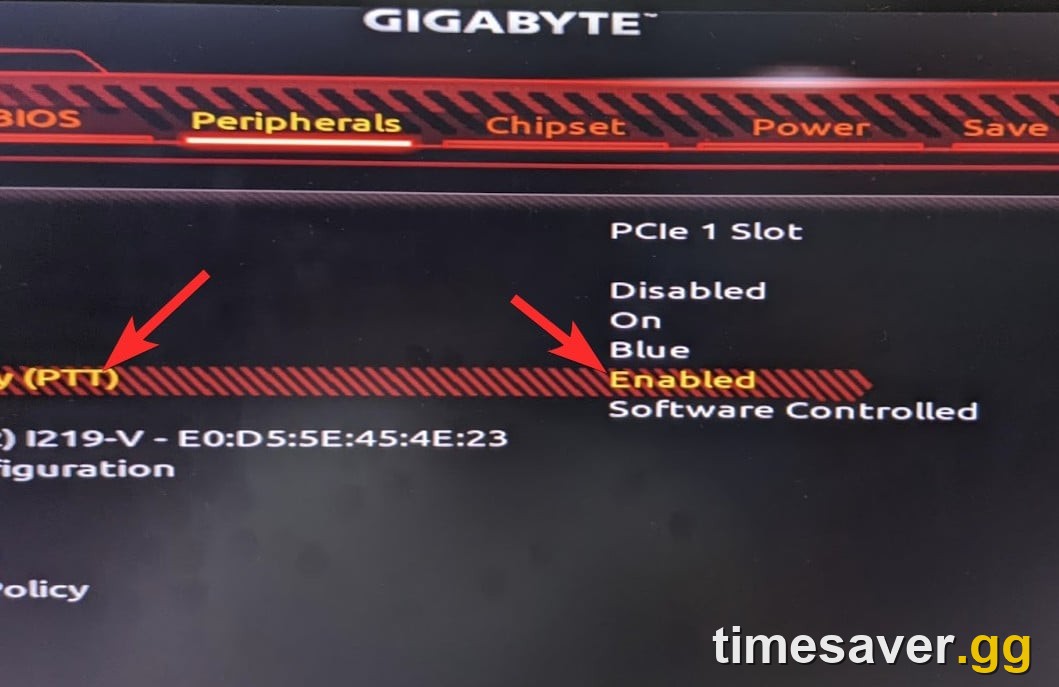
This is still the biggest wall on PC, and the rule is stricter for MW4 than for its siblings. Activision's TPM 2.0 and Secure Boot article says that for Black Ops 7 and Warzone, non-compliant players lose Ranked Play and may be matched separately. For Modern Warfare 4, players who don't meet the requirements "will be restricted from playing any online game mode." No TPM 2.0 and Secure Boot means no online MW4.
The fastest diagnosis is Activision's own tool: the Call of Duty Secure Attestation Wizard, currently version 1.3.0, updated October 21, 2026. Extract the .zip, run `CODSecureAttestationWizard.exe`, accept the terms and scan. Each failing result maps to one fix:
- TPM 2.0: Not Enabled — enable it in UEFI/BIOS. It appears as Intel PTT on Intel, AMD CPU fTPM on AMD, or a discrete TPM (dTPM). Activision's minimums are Intel 8th Gen or newer and AMD Ryzen 2000 series or newer. To check from Windows, press `Win + R`, type `tpm.msc`, and look for "The TPM is ready for use."
- Secure Boot: Not Enabled — turn on Secure Boot in UEFI. If the option is greyed out, the board is usually still in Legacy/CSM mode (next item).
- BIOS Boot mode not set to UEFI and Boot Partition not set to GPT — Secure Boot needs UEFI boot and a GPT disk, not MBR. Convert the system disk with Microsoft's MBR2GPT tool: back up first, run `mbr2gpt /validate /allowFullOS` before converting, and suspend BitLocker if the drive is encrypted. Then switch boot mode to UEFI.
- BIOS Firmware Update Required — you pass the minimum today, but Activision says an update "is recommended and may be required in the future." Get the BIOS from your motherboard vendor's support page.
- Authorization Key Failed — the official Wizard result. AMD owners have also been posting about a broader "fTPM AIK enrollment" attestation failure, which may or may not show this exact result. Activision says this result means your User Account Control settings blocked the full scan. Select Generate Key, and when Windows shows a UAC prompt for enrollaik.exe, select Yes. In the r/CallOfDuty thread about it, the first reply was to update the motherboard to its current BIOS, which matters most on new AM5 boards.
- TCG Event Log Failed — your Windows build is behind. Restart and install the latest Windows update. The OS floor is Windows 10 version 22H2 or any Windows 11 build.
If every check passes and MW4 still refuses, read our follow-ups: MW4 Secure Boot & TPM 2.0 error fix (every BIOS layout) and MW4 'Failed Attestation' even with TPM and Secure Boot on.
How do I fix DEV ERROR 0x723AC2A5 and 0x00001338 in MW4?
These PC crash codes come up repeatedly in MW4 player threads, and they are not on any Activision MW4 support page yet. Treat everything in this section as community-sourced.
What we know:
- 0x00001338 with 0x723AC2A5 was first reported in the beta as a boot crash (r/modernwarfare4 thread). The crash log (`info.json`) pointed at a region-specific file, `sa_code_pre_gfx.ff`, on accounts in Saudi Arabia and the UAE. Players there fixed it with a VPN at the time.
- Since campaign early access, the same code has been reported mid-campaign and during shader compilation by players with no regional link, so it is no longer only a regional problem.
- 0xc0000005 (STATUS_ACCESS_VIOLATION) is a memory-access crash that often shows up next to it.
The fixes players reported in this r/modernwarfare4 crash thread (individual reports, not a tested ranking):
- Turn off ray tracing and frame generation. Two players, one on an RTX 4070, said this was the only thing that stopped the crashes, one of them after two hours of testing.
- Close the NVIDIA app and its overlay (and other overlays: Discord, recording tools, RGB software). One player got the campaign working again just by closing the NVIDIA app. Activision's own crash article says overlays, input-remapping and recording software "may interfere with gameplay or disrupt the game's boot process, even if they're not running."
- Let shaders finish compiling before you queue. Crashes during compilation are common: one player still crashed at 76% even with the overlay disabled, so combine this with step 1.
- Remove GPU overclocks. One player's tip for AMD cards was to set the clock about 60 MHz below the vendor's spec.
- Turn off V-Sync. One player reported this as their fix.
- Turn Memory Integrity on (Windows Security → Core Isolation). This was the original post's fix, and other players said it did nothing for them, so try it last.
Then follow the official PC basics: GPU drivers on Activision's recommended versions, background apps closed, and Battle.net or Steam file verification. If you're crashing at launch rather than mid-match, our earlier campaign won't launch / crashing fix covers the launcher side.
What does a DirectX error mean in MW4?
A DirectX error is a general graphics-API failure. Activision's DirectX Errors article says to make sure you have the latest version of DirectX installed. In practice, pair that with:
- A clean GPU driver install on the recommended version.
- Clearing the DirectX shader cache (Windows Disk Cleanup → DirectX Shader Cache), then letting MW4 rebuild shaders.
- Dropping any GPU overclock.
If DirectX errors come with stutter rather than hard crashes, the settings in our MW4 stuttering & FPS drops fix and best PC settings for FPS apply. If the game looks soft rather than crashing, that's a different issue: see MW4 blurry or grainy graphics fix.
What is error CE-34878-0 on PlayStation in MW4?
CE-34878-0 is PlayStation's general game-crash code. Sony's error-code page files it under PS4, but Activision's Crashes or Game Freezes page lists it for MW4 along with the message "An error has occurred with an application or system software." Activision's steps, in order:
- Restart the game. A one-off crash usually doesn't come back.
- Update the PS5 system software (Settings → System → System Software → System Software Update and Settings).
- Keep the console somewhere cool and well ventilated.
- Delete old files and game data you don't need.
- If crashes continue on an up-to-date console, contact PlayStation Support.
Why does MW4 crash on Xbox in the lobby?
Activision says most Xbox crashes happen in the public Multiplayer lobby before a match or right after one ends. Its fixes:
- Update the console (Profile & system → Settings → System → Updates).
- Clear the console cache.
- Reset the MAC address: Settings → Network → Network settings → Advanced settings → Alternate MAC Address → Clear → Restart.
- Remove third-party accessories. Activision doesn't guarantee functionality with third-party memory cards, controllers or cables.
Call of Duty: Modern Warfare 4 - Mastery Camo Bundle
Get mastery camos in 10 minutes
How do I fix MW4 freezing on Switch 2?
Switch 2 puts the console to sleep by default, and a sleep/wake cycle doesn't clear a crashed state. Activision's fix is a full restart: hold POWER for at least three seconds → Power Options → Restart. If the console is fully frozen, hold POWER to force a shutdown and wait at least 30 seconds before turning it on again. Turn on Settings → System → Share Error Information so your crash reports reach Activision.
Why does MW4 say "Networking Failed to Start" or get stuck connecting?
Connection errors fall into two groups, and you need to know which one you have before changing anything.
First, check if it's Activision's side. The Connecting to Modern Warfare 4 article says to check the official server status first. If your platform's indicator isn't green or an alert is posted, the fix is to wait. Our MW4 server status guide explains how to read it.
If status is green, check your platform's services, then troubleshoot your connection. Activision links the PlayStation Network, Xbox and Nintendo status pages too. Then its checklist: play on wired Ethernet, restart the router, pause other heavy downloads or streams, then work through its three router tests one at a time, testing the game after each: Test 1: turn Port Forwarding off and enable UPnP. Test 2: turn UPnP off, turn Port Forwarding on, and give the console a static IP. Test 3 (consoles only): turn Port Forwarding off and put the console's static IP in the router's DMZ — then remove it from the DMZ once you've tested.
The two error variants each have their own page:
- "Networking Failed to Start" with a two-word code like HUENEME – NEGEV: full breakdown and fixes.
- Stuck on "Connecting to Online Services" in COD HQ: every fix for PC, PS5, Xbox and Switch 2.
What are Activision's official MW4 known issues right now?
As of October 24, Activision's Known Issues in Modern Warfare 4 page lists four open issues. None has an error code; they show up as missing buttons or progress that doesn't save:
- Can't save Loadouts in Multiplayer (all platforms) — under investigation, no workaround yet. Re-check your class before each match.
- Stats not showing in Combat Record or Leaderboards (all platforms) — Activision: "This is a display issue only; stats are still being tracked." Your K/D and wins are safe.
- No button to launch the game from COD Home (Xbox on PC) — under investigation. Activision's tips: check that you haven't hit the 10-device limit in Microsoft Store device management, and install any MW4 Content Packs you're missing. Our COD HQ launcher & storage guide shows where those packs are.
- Can't Prestige an Operator in DMZ (all platforms) — workaround: equip Rare weapons with only three attachment slots (weapons that have never had four or more attachments). For other DMZ blockers, see MW4 DMZ not working: the Gear Up order bug.
The launch patch notes already "fixed several stability and crash issues for a better experience across all modes," including Military Camos and Apex Attachments that appeared locked again after a weapon Prestige. Infinity Ward says ongoing fixes are tracked on its Trello board. Two related bugs have their own pages: camo challenges not tracking and pre-order bonus not showing.
Which MW4 error fixes should you try first?
Start with the cheap steps before you touch the BIOS:
- Check server status. If it's red, nothing on your end helps.
- Fully restart the game, then the platform (full Switch 2 restart, Xbox cache clear, PS5 restart).
- Update everything: console firmware, Windows, GPU driver, and MW4 itself.
- PC only: run the Secure Attestation Wizard and fix whatever it names.
- PC crashes: ray tracing and frame gen off, overlays closed, overclocks removed.
- Still stuck: submit a Call of Duty PC Crash Report or a bug report. Activision says these feed its crash investigations.
Back in the game and want to make up for lost launch time? MW4 bot lobbies, camo and weapon leveling are ready now:
- MW4 Bot Lobbies — private easy lobbies for leveling and camo grinding.
- MW4 Mastery Camo Unlock — mastery camos done for you.
- MW4 Weapon Leveling — max any gun and unlock its attachments fast.
- MW4 Account Leveling — skip the rank grind.
- All MW4 services — the full Modern Warfare 4 hub.
Confirmed vs community-reported: how reliable is each fix?
- Confirmed by Activision: MW4's launch on October 23, 2026; TPM 2.0 and Secure Boot required for all online play on PC; the Secure Attestation Wizard v1.3.0 results and fixes; CE-34878-0 (listed under PS5) and the PS5, Xbox and Switch 2 crash steps; the DirectX guidance; the four open known issues and the DMZ Prestige workaround.
- Community-reported: everything about DEV ERROR 0x723AC2A5 / 0x00001338 and 0xc0000005, including the ray tracing, frame gen, overlay, underclock and Memory Integrity fixes. They have worked for some players and not others, and Activision hasn't confirmed a cause.
- Not yet published: the multiplayer patch notes Activision says it is "releasing over the coming days," and any official MW4 error-code list. We'll update this page when either goes live. If you're still on the beta-era errors, our older MW4 beta not working fixes page is kept for reference.
FAQ
Is there an official list of MW4 error codes? No. Activision splits MW4 troubleshooting across its Known Issues, Crashes or Game Freezes, Connecting, and TPM/Secure Boot support pages. This page combines them and marks which fixes are official and which come from players.
Why can't I play MW4 online on PC even though the game opens? MW4 requires both TPM 2.0 and Secure Boot, and Activision says non-compliant PCs are restricted from every online mode. Run the Call of Duty Secure Attestation Wizard (v1.3.0) to see which check fails.
What does "Authorization Key Failed" mean in the Attestation Wizard? Activision says Windows User Account Control blocked the full TPM scan. Select Generate Key and approve the UAC prompt for enrollaik.exe.
How do I fix MW4 error 0x00001338? It isn't on Activision's support pages yet. Players report fixing it by turning off ray tracing and frame generation, closing the NVIDIA overlay and other overlays, removing GPU overclocks, and letting shaders finish compiling.
What is CE-34878-0 in Modern Warfare 4? It's a general PlayStation game-crash code. Activision lists it on its MW4 PS5 troubleshooting page, though Sony's own documentation files it as a PS4 error. Restart the game, update your PS5 system software, and delete old data. If it keeps happening on an up-to-date console, contact PlayStation Support.
Are my MW4 stats lost if they don't show in Combat Record? No. Activision says it's a display issue only and your stats are still being tracked.